architecture
system overview
CDL Scheduler is a two-tier web application that combines a static frontend with a serverless backend to provide appointment scheduling powered by Google Calendar.
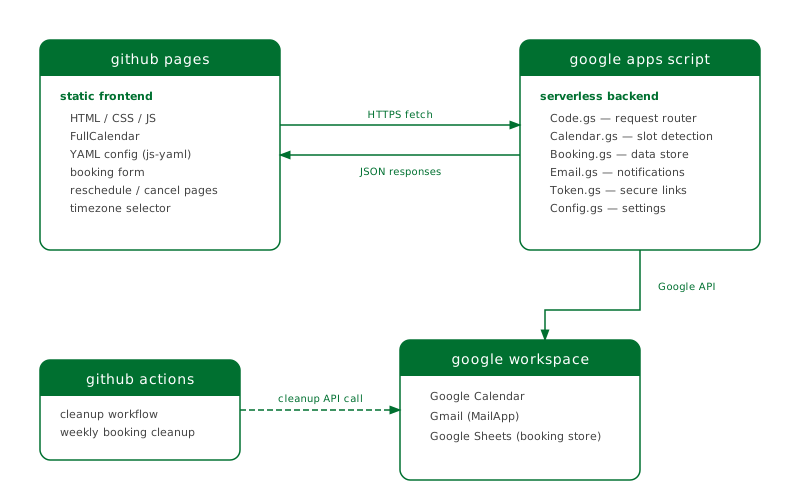
components
frontend (GitHub Pages)
The frontend is a static site served from GitHub Pages. It loads configuration from YAML files at build time and communicates with the backend via HTTPS fetch requests.
Meeting type selection — reads
config/meeting-types.yamlto display available meeting types with descriptionsCalendar view — uses FullCalendar to render available time slots fetched from the backend
Booking form — collects visitor name, email, meeting format (virtual/in-person), purpose, and notes
Reschedule/cancel pages — token-authenticated pages for managing existing bookings
Key files:
index.html— meeting type selection pagebook.html— calendar view and booking formreschedule.html— reschedule flow with calendarcancel.html— cancellation confirmationconfig/settings.yaml— timezone, Apps Script URL, display settingsconfig/meeting-types.yaml— meeting type definitionsconfig/locations.yaml— virtual and in-person location options
backend (Google Apps Script)
The backend runs as a Google Apps Script web app, deployed as an API executable. It handles all server-side logic:
Code.gs — request router (
doGet/doPost), dispatches to action handlers for booking, rescheduling, cancellation, and slot retrievalCalendar.gs — availability detection engine; finds availability windows by title pattern, subtracts busy times from configured conflict calendars, and generates bookable slots
Booking.gs — booking data store using Google Sheets as a database; creates, retrieves, updates, and deletes booking records
Config.gs — configuration wrapper around
PropertiesServicefor Script Properties with sensible defaultsEmail.gs — sends confirmation, cancellation, and reschedule notification emails with iCal attachments
Token.gs — generates and validates secure tokens for booking management links
google workspace integration
Google Calendar — the source of truth for availability and bookings. Availability windows are regular calendar events matching a configurable title pattern (e.g., “Office hours”). Bookings are created as calendar events with attendees.
Gmail (MailApp) — sends transactional emails (confirmations, cancellations, reschedule notifications) with iCal attachments
Google Sheets — serves as the booking database, storing booking records with tokens, status, and metadata
data flow
booking flow
Visitor selects a meeting type on the GitHub Pages frontend
Frontend fetches available slots from Apps Script (
action=getSlots)Apps Script finds availability windows on the designated calendar by pattern match
Apps Script checks configured conflict calendars for busy times
Free windows are split into slots of the requested duration
Visitor picks a slot and submits the booking form
Apps Script creates a calendar event, stores the booking in Sheets, and sends confirmation emails
Both parties receive email with booking details and manage links (reschedule/cancel)
reschedule flow
Visitor clicks the reschedule link (contains a secure token)
Frontend loads the booking details and fetches new available slots
Visitor picks a new time slot
Apps Script deletes the old calendar event, creates a new one, updates the booking record with a new token, and sends notification emails
cancellation flow
Visitor clicks the cancel link (contains a secure token)
Frontend shows the booking details and asks for confirmation
Apps Script deletes the calendar event, marks the booking as cancelled, and sends cancellation emails
github actions
A scheduled GitHub Action (cleanup.yml) calls the Apps Script cleanup endpoint daily to remove expired booking records from Google Sheets. It uses the CLEANUP_KEY secret for authentication.